
How category-based filters work
Last updated July 9, 2025
OutboundSync has a feature called category-based filters. This allows you total control over what data syncs from your Sales Engagement Platform (SEP) via OutboundSync.
The way it works is that OutboundSync will capture all data related to a lead—emails sent, replies, opens, etc.
OutboundSync will "hold" on to those webhook payloads until a Lead Category Update payload is received that matches the allowlist or included categories. Once received, we release all the related webhook payloads.
Below you will find a video walkthrough and a step-by-step explanation.
Video walkthrough
Step-by-step explanation
First, review this visual flowchart that shows how it works:
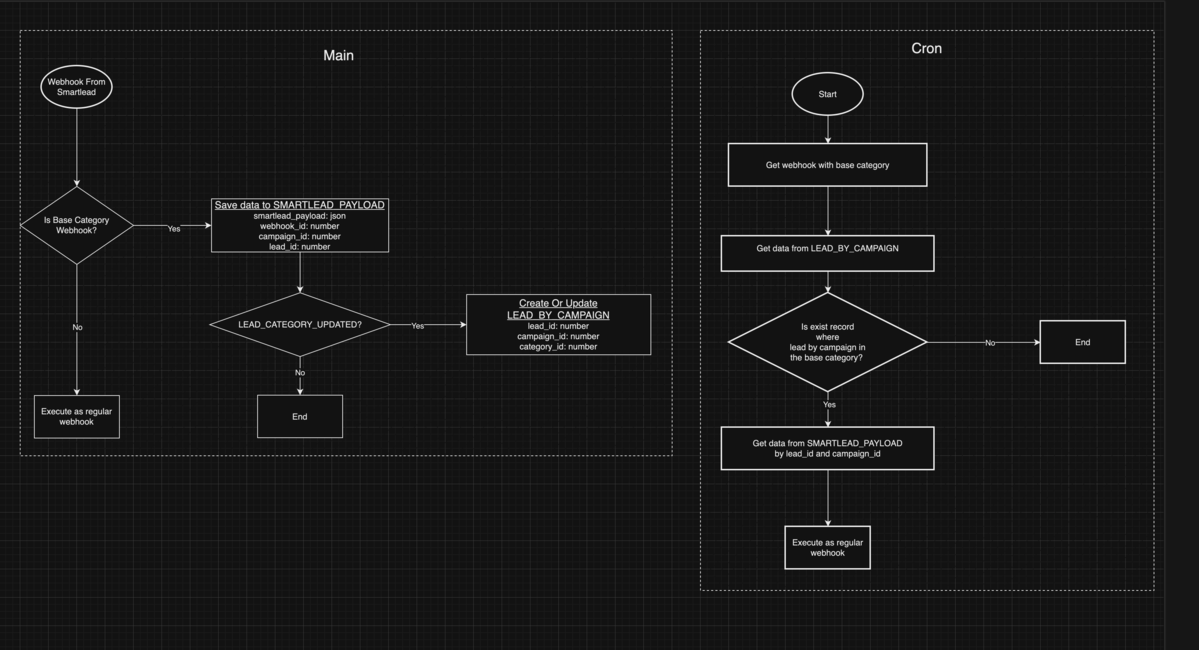
For all webhook payloads, your SEP has the identifying data campaign_id and lead_id. The same lead_id can have different lead_categories for different campaigns.
Here's an example case:
- Your SEP sends us a payload, for example
SENT_EMAIL. - We save the
campaign_id,lead_idand thewebhook_idfrom your SEP . - Your SEP sends us a follow-up payload for that same
campaign_idandlead_id, for exampleOPEN_EMAIL. - We save the
campaign_id,lead_idand thewebhook_idfrom your SEP. (OutboundSync saves all payloads from the SEP in the Category-based filter queue.) - If we get
LEAD_CATEGORY_UPDATEDpayload from your SEP, then we save thecampaign_id,lead_idandlead_category_id. - Only
LEAD_CATEGORY_UPDATEDpayloads can change thelead_category_id - OutboundSync checks if the
lead_category_idmatches what you set for your approved lead categories in OutboundSync's Category-based filters in your webhook settings. If there is a match, then we find all payloads for thislead_idandcampaign_idand send all payloads to your endpoint.
If your SEP sends over one lead category, but you change the status, this updated status will be stored in OutboundSync and will apply to future webhook payloads.